Thursday, December 17, 2009

Topic 5 & 6 Information Dashboard Design

basically this week i have learnt quite a handful of things regarding dashboard, in areas like types of dashboard of the designing specification and things to take note when designing a dashboard.

Types of dashboard
this is some information i found from the net, do take a look : http://www.maguireassoc.com/services/strategic_planning_dasboard.pdf

however in the lecture notes, Dashboards can be use for Strategic Purposes Anayltical purposes and operational purposes as well

1.Strategic purposes dashboard
-Focus on high-level measures of performance
-Forecasts
-Indicators of performance
-Contextual information
-Simple display mechanism
-Don’t require real-time data, static snapshots will do

2.Analytical Purposes Dashboards
-support interactions with the data (e.g. drill-down)
-Show patterns for further exploration
-More sophisticated display media

3.Operational Purposes Dashboards
-Real-time information is needed for constantly changing environment
-Must grab attention immediately to alert abnormalies
-Deeper level of details is needed – can be accessed by drilling down

on top of it, i also learnt about Gestalt Principles of Visual Perception

1. Principle of Proximity
Proximity occurs when elements are placed close together. They tend to be perceived as a group.

2. Principle of Closure
Closure occurs when an object is incomplete or a space is not completely enclosed. If enough of the shape is indicated, people percieve the whole by filling in the missing infomation

3. Principle of Similarity
Similarity occurs when objects look similar to one another. People often perceive them as a group or pattern.

4. Principle of Continuity
Continuation occurs when the eye is compelled to move through one object and continue to another object.

5. Principle of Enclosure
Enclosure occurs when an object is incomplete or a space is not completely enclosed. If enough of the shape is indicated, people percieve the whole by filling in the missing infomation

6. Principle of Connection
Perception of grouping produced by connection is stronger than that produced by proximity or similarity colour, size and shape)

you could refer to @http://www.scholarpedia.org/article/Gestalt_principles for more information of the principles.

Key goals and steps of visual dashboard design
1.Reduce the Non-Data Pixels
-Eliminate all unnecessary non-data pixels such as remove Unnecessary border around sections of data fragment the display, fill colours to separate sections of the display are unnecessary, 3D should be avoided when the added dimension of
depth doesnt represent actual data

2.De-emphasize and regularize the non-data pixels that remain such as Axis lines are useful but can be muted, Minimise lines, borders and fill colours for
delineating sections of data

on the other hand, there are also ways to enhance data pixels by
Highlight the most important data pixels that remain
-Information that is always important
-Can be emphasized using static means
-Information that is only important at the moment
-Requires a dynamic means of emphasis

here are some examples of bad dashboard design as it uses bright colours and the data is closely together:


you can also refer to http://www.information-management.com/issues/20050901/1035522-1.html for example of good dashboard design.
you can also refer to http://www.perceptualedge.com/articles/visual_business_intelligence/pervasive_hurdles_to_dd.pdf for a better detail of dashboard designing.

There are also total of Six categories of display media:
1.Graphs
2.Images
3.Icons
4.Drawing objects
5.Text
6.Organisers

Bar/Column vs Line Graphs
Column or bar graphs are better than line graphs when you are comparing between groups of information such as age groups or different regions.

On the other hand, line graph is used to show the trend better. For example, you want to know how well sales have been doing for the past 3 months; you can straightaway see the increase/decrease in sales by looking at the gradient of the line. A steeper slope will indicate a higher increase in sales.

Stacked Bar/Column Graph

One disadvantage of using stacked bar/column graphs is that it is not easy to compare the different parts; it is only good to see it as a whole. Displaying the distribution of sales between the four channels (Reseller, Web, Distributor, Direct) by using column graph would be better than stacked column graph; it will be easier to compare the difference in the distribution.

Scatter Plots

Scatter plot displays whether or not the 2 paired sets of quantitative values are correlated.

Topic 4: Data Warehouse and OLAP

This week, i have learn about the differences between operational database and data warehouse.

There are several approach when creating a data warehouse namely:
1. Star Schema (http://en.wikipedia.org/wiki/Star_schema)
2. Snowflake Schema (http://en.wikipedia.org/wiki/Snowflake_schema)
3. Constellation Schema (http://datawarehouse4u.info/Data-warehouse-schema-architecture-fact-constellation-schema.html)

The star schema is the simplest style of data warehouse schema. it consists of a few fact tables referencing any number of dimension tables. it is also considered an important special case of the snowflake schema.

structure of star schema:


speaking of snowflake schema,it is a logical arrangement of tables in a multidimensional database such that the entity relationship diagram resembles a snowflake in shape. Closely related to the star schema, the snowflake schema is represented by centralized fact tables which are connected to multiple dimensions.

stucture of snowflake schema:


In a fact constellation schema, different fact tables are explicitly assigned to the dimensions, which are for given facts relevant. This may be useful in cases when some facts are associated with a given dimension level and other facts with a deeper dimension level.

structure of constellation schema:


Parent child dimension
A parent-child dimension is based on two dimension table columns that together define the lineage relationships among the members of the dimension. One column, called the member key column, identifies each member; the other column, called the parent key column, identifies the parent of each member. This information is used to create parent-child links, which are then combined into a single member hierarchy that represents a single meta data level.

For example, in the following Employee table, the column that identifies each member is Employee_Number. The column that identifies the parent of each member is Manager_Employee_Number. (This column stores the employee number of each employee's manager.)


there is also 3 types of OLAP namely:
1.Relational OLAP (ROLAP)
2.Multidimensional OLAP (MOLAP)
3.Hybrid OLAP (HOLAP)

1.Relational online analytical processing (ROLAP) is a form of online analytical processing (OLAP) that performs dynamic multidimensional analysis of data stored in a relational database rather than in a multidimensional database

2.MOLAP (multidimensional online analytical processing) is online analytical processing (OLAP) that indexes directly into a multidimensional database.MOLAP processes data that is already stored in a multidimensonal array in which all possible combinations of data are reflected, each in a cell that can be accessed directly. For this reason, MOLAP is, for most uses, faster and more user-responsive than relational online analytical processing (ROLAP)

3.Hybrid online analytical processing (HOLAP) is a combination of relational OLAP (ROLAP) and multidimensional OLAP (usually referred to simply as OLAP). HOLAP was developed to combine the greater data capacity of ROLAP with the superior processing capability of OLAP. HOLAP can use varying combinations of ROLAP and OLAP technology. Typically it stores data in a both a relational database (RDB) and a multidimensional database (MDDB) and uses whichever one is best suited to the type of processing desired.

you can take a look @http://businessintelligence.ittoolbox.com/documents/advantagesdisadvantages-of-molap-rolap-and-holap-15897 it describes the advantages and disadvantages of using different types of OLAP.

Furthermore, there are eight basic steps while Designing a data warehouse fact table:
1) Choosing the data mart for the small group of end users we
deal with.
2) Fact table granularity (the smallest defined level of data in the
table is determined.
3) Fact table dimensions are selected.
4) Determine the facts for the table. In most cases, the granularity
is at the transaction level, so the fact is the amount.
5) Storing pre-calculations in the fact table
6) Rounding out the dimension tables
7) Choosing the duration of the database
8) The need to track slowly changing dimensions

Topic 3: Developing Dashboard

in this week, i have learnt the differences between a scorecard and a dashboard:

Here are some steps mention in the link (http://www.enterprise-dashboard.com/2009/05/18/8-step-approach-to-developing-clinical-dashboards/) when creating a dashboard:

Here are the 8 steps:

1. Meet with users to determine data needs
2. Design the presentation layer
3. Design the semantic layer
4. Design the physical layer
5. Develop and test all 3 layers
6. Perform QA
7. Conduct a Pilot
8. Begin general rollout

however, as compared to the lecture slides, the steps are different:

1.Start small, with winnable systems
2.The business manager, not IT, should own the dashboard
3.Select metrics using a scientific management method
4.Limit dashboards to the “critical few” Key Performance Indicators (KPIs)
5.Get results quickly
6.Dashboards are just part of the culture

Here are some guidelines for effective dashboard design:

1.Group information visually by decision criteria
2.Display analysed information, not raw data
3.Automate business rules to identify problems and makedecisions through alerts
4.Show context, judgements and comments – create a inked text box
5.Give access to source data – manager may want to see the actual data to identify nuances


Here’s a screenshot of the Oracle dashboard showing a small navigational popup for a data value (see the data table at the bottom of the screen).


Besides dashboard, i have also learned business process mapping (http://en.wikipedia.org/wiki/Business_process_mapping). Process mapping is a tool that is used to understand, analyse and document processes and activities in an organisation and assist in identifying opportunities for improvement.

Typical reasons for conducting process mapping are:
1.To improve a process, you must understand the process
2.Complexity of processes and lack of understandingconstrains management’s attempts to improve processes
3.Analytical skills and process mapping skills allow us tounderstand and communicate processes to management, staff and users
4.Identifies efficiency issues and where systems can support these

one process mapping is the Cross-functional Swim lane Flowchart (http://en.wikipedia.org/wiki/Swim_lane)
The swim lane flowchart differs from other flowcharts in that processes and decisions are grouped visually by placing them in lanes. Parallel lines divide the chart into lanes, with one lane for each person, group or sub process. Lanes are labelled to show how the chart is organized.

this is an example of how an swim lane process map looks like:


through swim lane model, any individuals can have an overview how each transaction or process is done from the start to the end, and who or which department is involved during the process. hence, it will be a good model for trainee or for project purposes to understand the business processes.

Topic 2:Business Performance Management

What I have learnt in this topic:
- Business Performance Management (BPM)
- Closed-Loop Processes
- Developing Strategic Themes
- Balanced Scorecard (BSC)

BPM is an umbrella term covering the business methodologies, metrics, processes and systems used to drive the overall performance of an enterprise. (http://en.wikipedia.org/wiki/Business_performance_management) you can click on the link for further details of BPM

Go to http://www.oracle.com/technology/products/ias/bpel/pdf/bpm.closedloop.pdf , for more information about closed loop process which link strategy to execution in order to optimize business performance.

The balanced scorecard (BSC) is a strategic performance management tool - a semi-standard structured report supported by proven design methods and automation tools can be used by managers to keep track of the execution of activities by staff within their control and monitor the consequences arising from these actions

There are four perspective involved, namely:
The "financial perspective" encourages the identification of a few relevant high-level financial measures. In particular, designers were encouraged to choose measures that helped inform the answer to the question "How do we look to shareholders?"

The "customer perspective" encourages the identification of measures that answer the question "How do customers see us?"

The "internal business perspective" encourages the identification of measures that answer the question "What must we excel at?"

The "innovation and learning perspective" encourages the identification of measures that answer the question "Can we continue to improve and create value?".

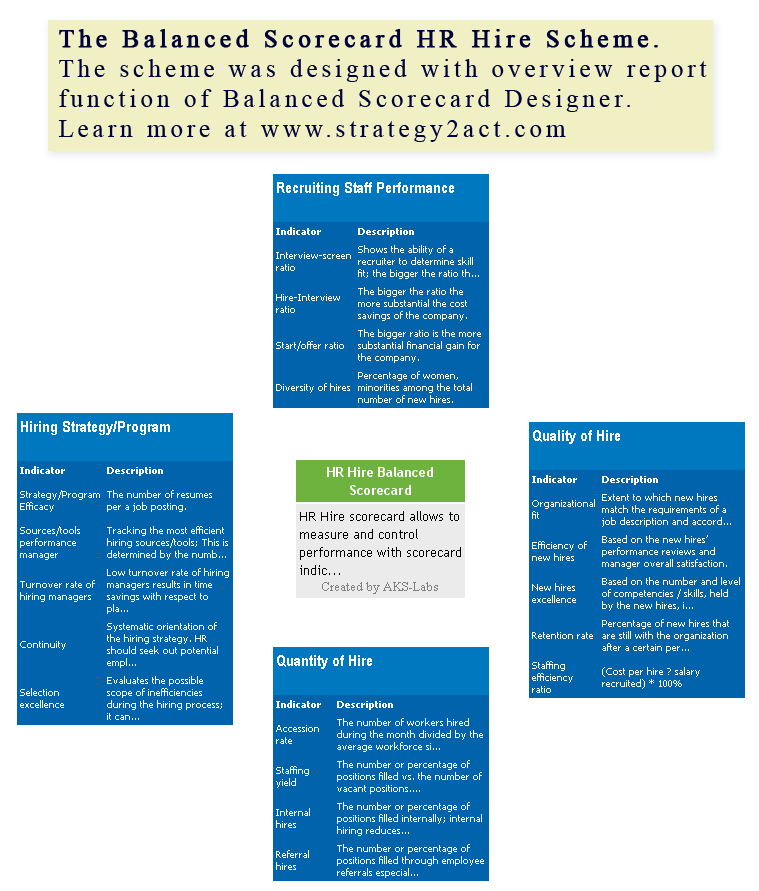
Below is an example of an balanced scorecard:


For more information about balanced scorecard, you can go to:
http://www.balancedscorecard.org/BSCResources/AbouttheBalancedScorecard/tabid/55/Default.aspx\
http://www.valuebasedmanagement.net/methods_balancedscorecard.html
http://managementhelp.org/org_perf/bal_card.htm

on the other hand, this topic also covers PESTEL analysis, Porter’s 5 forces and SWOT analysis. however we already been taught in marketing and managment. this technique helps organisation to Develop Strategic Foundation and helps them to further understand their company environment.

for more information about SWOT analysis, you can go:
http://en.wikipedia.org/wiki/SWOT_analysis
for more information about PESTEL analysis, you can go:
http://en.wikipedia.org/wiki/PEST_analysis
for more information about Porter's 5 forces, you can go:
http://www.quickmba.com/strategy/porter.shtml

Topic 1: Introduction to BI

from topic 1, i have learnt that what Business intelligence is and how it supports decision making in order to improve business operations.

Business Intelligence (BI) is basically connecting data to effective action by drawing reliable conclusions about the current conditions and future events.

In this topic, it also covers a review on the 3 types of multidimensional database, which commonly known as Data Warehouse, namely: (the following links helps us to further understand what each schema is)

i. Star Schema (http://en.wikipedia.org/wiki/Star_schema)
ii. Snowflake Schema (http://en.wikipedia.org/wiki/Snowflake_schema)
iii. Constellation Schema (http://datawarehouse4u.info/Data-warehouse-schema-architecture-fact-constellation-schema.html)

However when you have a high volume of data, you can choose star schemas as it gives you better performance.

on the other hand, i also learnt about two data visualization which helps users to interpret the data in a more easy manner which is:

Scorecards: A visual presentation of critical data for executives to view, it allows executives to see hot spots in seconds and explore the situation.


Dashboards: A visual presentation to help managers and supervisors monitor operational performance and success of tactical initiatives such as marketing campaigns and sales performance.


Scorecard shows summary information and monitor alignment and success of strategic objectives and is mostly used by the executives whereas dashboard shows both detailed and summary information for operational and tactical wise, and its commonly used by managers supervisor or frontline crew.

on top of it, there is also Performance management systems (PMS) which are BI tools
that provide scorecards and other relevant information that decision makers use to determine their level of success in reaching their goals. It is also a framework for defining, implementing, and managing an enterprise’s business strategy by linking
objectives with factual measures.

Besides, There is also online analytical processing (OLAP):http://en.wikipedia.org/wiki/Online_analytical_processing

with 2 types of OLAP:

i) Multidimensional OLAP (MOLAP):http://en.wikipedia.org/wiki/MOLAP
OLAP implemented via a specialized multidimensional database (or data store) that summarizes transactions into multidimensional views ahead of time

ii) Relational OLAP (ROLAP):http://en.wikipedia.org/wiki/ROLAP
The implementation of an OLAP database on top of an existing relational database